微信公众号开发
说明:实现微信端访问客户端首次输入账号密码登录后客户自动登录客户端,PS:如需解绑,前往客户端登录后解除微信授权绑定
登录微信公众号后台:https://mp.weixin.qq.com/
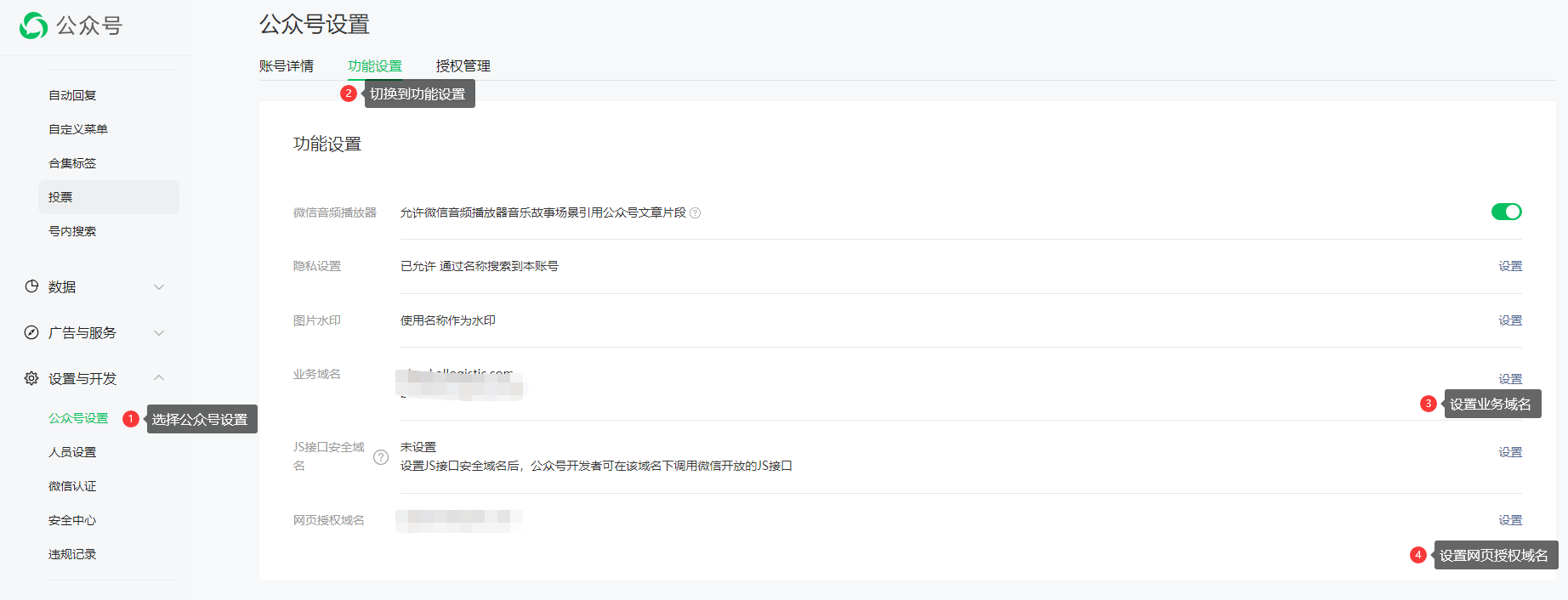
第一步域名配置:
业务域名填写上:
第一个域名:客户端域名地址根据自己客户端的域名进行填写:XXXX.ollogistic.com
第二个域名:business.logistic.mobi
网页授权域名填写上:
business.logistic.mobi
第二步ip白名单配置:
ip白名单:
112.74.51.155
43.136.107.227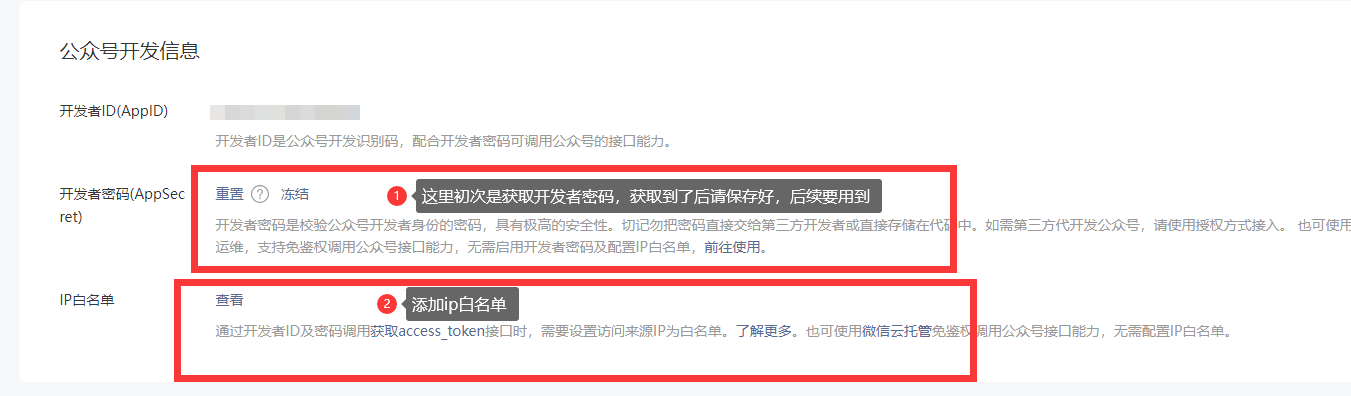
第三步登录达因用户续费后台系统配置上微信公众号相关信息
网址:http://master.dayinsoft.com/
快捷方式地址:
1.需要自动登录的:
{apdid}、{redirect_uri}需要替换
首页:https://{域名前缀}.ollogistic.com/login
运费计算:https://{域名前缀}.ollogistic.com/login?redirect=%2Ffreighttrial%2Findex
免登陆查询轨迹:https://{域名前缀}.ollogistic.com/tracking
创建订单:https://{域名前缀}.ollogistic.com/login?redirect=%2Fprewaybill%2Faddoredit
订单列表:https://{域名前缀}.ollogistic.com/login?redirect=%2Fprewaybill%2Findex
自定义菜单:运费计算:https://open.weixin.qq.com/connect/oauth2/authorize?appid={appid}&redirect_uri={redirect_uri}&response_type=code&scope=snsapi_base#wechat_redirect
自定义菜单:免登陆查询轨迹:https://{域名前缀}.ollogistic.com/tracking
自定义菜单:创建订单:https://open.weixin.qq.com/connect/oauth2/authorize?appid={appid}&redirect_uri={redirect_uri}&response_type=code&scope=snsapi_base#wechat_redirect
自定义菜单:订单列表:https://open.weixin.qq.com/connect/oauth2/authorize?appid={appid}&redirect_uri={redirect_uri}&response_type=code&scope=snsapi_base#wechat_redirect
2.不需要自动登录的
首页:https://{域名前缀}.ollogistic.com/login
运费计算:https://{域名前缀}.ollogistic.com/login?redirect=%2Ffreighttrial%2Findex
免登陆查询轨迹:https://{域名前缀}.ollogistic.com/tracking
创建订单:https://{域名前缀}.ollogistic.com/login?redirect=%2Fprewaybill%2Faddoredit
订单列表:https://{域名前缀}.ollogistic.com/login?redirect=%2Fprewaybill%2Findex
文档更新时间: 2024-11-15 09:46 作者:dy13750292337